
Epicor ERP Knowledge base
Kinetic • v10 ERP • v9 ERP • Vantage
Guides, how-to’s, and help for customizations and other tricks for developers and Epicor admins.
Select a Category...





Every Epicor screen has a status message that you might want to control with code to keep the user updated on any long-running processes. Learn how!

How can you grab Epicor session variables easily in order to use them in customizations? Check this reference post out and bookmark it!

Looking for Epicor BPM custom code examples? Here's one where we create automatic journal entries via BPM. Check it out!

I created a BPM to write journal transactions into Epicor's GL and ran into an error. I needed to wrap the call in an Epicor transaction scope. Check this out!

Do you need a way to incorporate custom Epicor database tables into a screen? Here's how you get started!

What if you want to email an Epicor BAQ report from customizations? Unfortunately, that is a little more complex but we are going to show you how!

We have already shown how you can call an Epicor BAQ from within customization but what if you want to call a BAQ Report? Well...here's how!

Linq (Language Integrated Query) is a modern C# technique that Epicor has sensibly standardized as the universal query language in BPMs. Get started here!

Do your employees forget to clock out, creating open labor records that mess up job costs? Learn how to adjust Epicor time clock entries automatically!

Did you know you can trigger Business Object methods from within an Epicor 10 BPM using some custom code? Let us show you how!
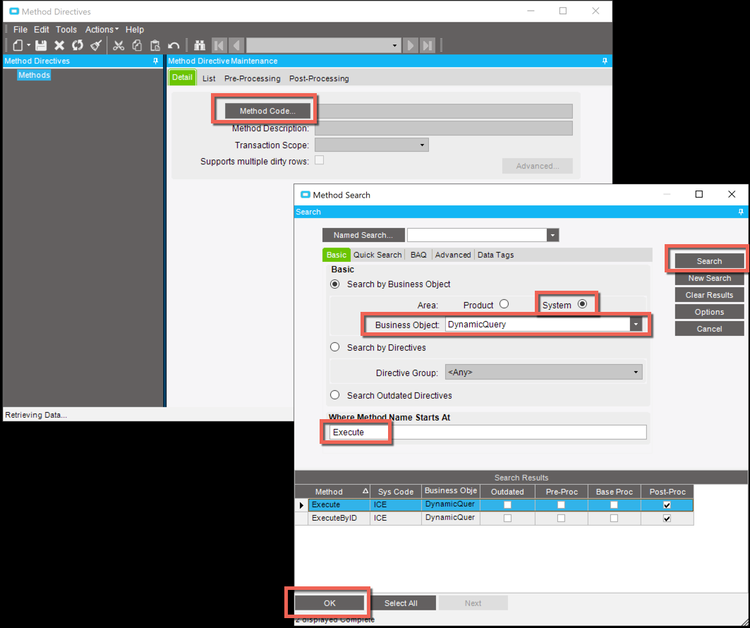
Do you have BAQs that you don't know if anyone is using? Here is how you can start logging when an Epicor BAQ is run (and by who) using a simple BPM.

An Epicor EpiViews is a layer provided within customizations that wrap around the tables/objects, defining how they relate and providing an interface to interact.
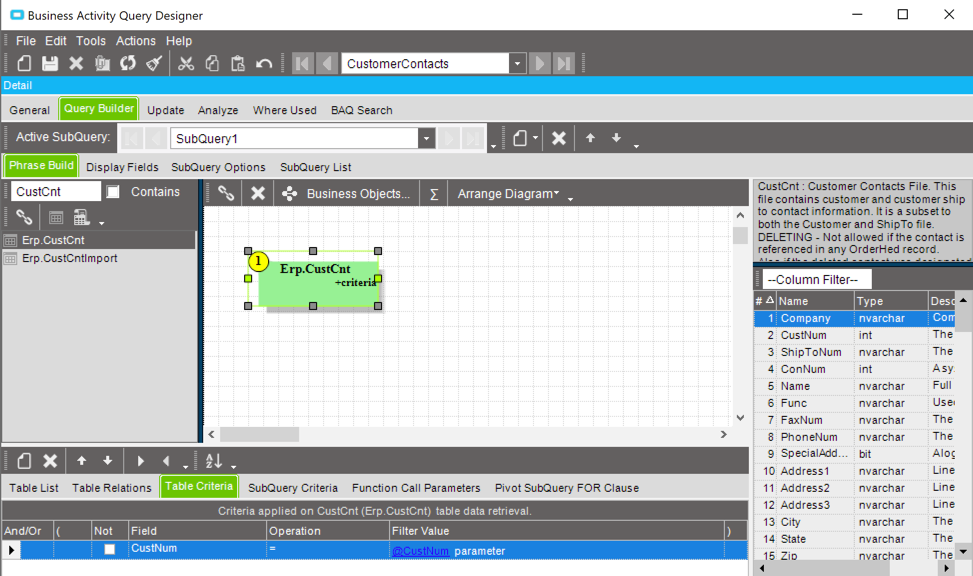
You've probably used BAQs to build dashboards and searches, but here we describe how to use Epicor to call a BAQ from embedded code customizations.

An Epicor 10 BPM allows you to send emails. But what about sending HTML emails with complex workflows? Check out how you can add custom code to do this!

Epicor comes with many scheduled tasks. But, do you need your own task that runs without any end-user intervention? Check out this hack to find out how!

As developers of Epicor customizations, we should make our work feel like standard Epicor screens. See how we placed new functionality in an Actions menu!

Epicor 10 ERP gives us a variety of ways to launch forms via code. Learn some of the Epicor programming scenarios to use to open and execute screens.

Ready to take your Epicor to the next level? Check out our latest Epicor 10 customization example as we create a completely new Epicor screen from start to finish!

Ever had issues with a multi-line text box in Epicor ERP printing all on 1 line? Learn how to get your Epicor SSRS reports to print correctly!

A new extension for Visual Studio enhances the Epicor customization & development experience. Learn the benefits and how you can take advantage of them!

Click here and let us walk you through Epicor IIOT, step-by-step and show you how Epicor ERP and IOT work together!

What happens when you need to pass data into an Epicor form but it is not a key-value? You can use Epicor's environmental variables. How? Learn how!

Ever wanted to customize the Epicor Part Lot Attribute Entry screen but found it frustrating? Take a look here and follow these simple steps!